
When planning a trip, travelers often compare several websites before booking flights, hotels, or other travel services. Trip.com is one of the popular online travel agencies that lets users search and book different travel products from one platform.
But is Trip.com legit? Is Trip.com safe to use? Are Trip.com flights reliable? And is Trip.com worth using instead of booking directly with an airline or hotel?
In this Trip.com review, we’ll look at how the platform works, what you can book, its prices, booking experience, customer service, pros and cons, and what travelers should know before making a reservation.
Quick verdict: Trip.com is a legitimate online travel agency with a wide selection of flights, hotels, and other travel services. It can be useful for comparing prices and finding convenient travel options, but travelers should always check baggage allowances, cancellation policies, refund terms, and the final price before booking.
What Is Trip.com?

Trip.com is an online travel booking platform that allows travelers to search and reserve flights, hotels, trains in selected markets, attractions, car rentals, and other travel services.
The platform serves travelers in numerous countries and provides both domestic and international travel options.
For travelers in India, Trip.com can be used to compare flights and accommodation across popular domestic and international destinations.
One of the platform’s main advantages is convenience. Instead of checking multiple airline and hotel websites separately, travelers can compare different options from one place.
What Can You Book on Trip.com?

Trip.com is designed as an all-in-one travel booking platform, allowing travelers to arrange several parts of their trip from one place.
Flights
Travelers can search and book domestic and international flights from a wide range of airlines. Trip.com lets you compare different routes, schedules, and fares before selecting a flight.
Hotels
You can book hotels and other accommodation through Trip.com. The platform offers properties in destinations around the world, allowing travelers to compare prices, locations, room types, amenities, ratings, and cancellation conditions.
Train Tickets
Trip.com also provides train booking options in selected markets. This can be useful for travelers who prefer rail travel when exploring destinations with extensive train networks.
Car Rentals
Car rental services are another option available through Trip.com. Travelers can search for rental vehicles when they need transportation at their destination.
Attractions and Activities
Depending on the destination, Trip.com also provides access to attractions, activities, tours, and other travel experiences. This allows travelers to organize more parts of their trip through one platform.
Booking Management
After making a reservation, travelers can access various booking-related services. These may include e-tickets, e-receipts, seat selection, flight changes, cancellation information, baggage details, and customer support.
Overall, Trip.com can be useful for travelers who want to search, compare, and book multiple travel services from one platform rather than using separate websites for different parts of their trip.
How Does Trip.com Work?
Using Trip.com is relatively simple.
1. Search for a Trip
Enter your destination, travel dates, and passenger or guest information.
For flights, you can search by departure and arrival cities. For hotels, enter your destination and check-in and check-out dates.
2. Compare Options
Trip.com displays available flights or hotels so you can compare prices, schedules, room types, and other details.
3. Review the Booking Conditions
Before making a payment, carefully check:
-
- Baggage allowance
- Cancellation policy
- Change fees
- Refund conditions
- Taxes and additional charges
- Hotel check-in requirements
- Passenger information
4. Make the Booking
Once you’ve selected an option, enter the required details and complete the payment.
5. Manage Your Reservation
After booking, you can access your itinerary and reservation details through your Trip.com account or mobile app.
Trip.com Prices and Deals
Price is one of the main reasons travelers consider using Trip.com.
Depending on your destination and travel dates, the platform may offer competitive prices on flights and hotels. Promotional offers, member discounts, and other deals can sometimes make the final price attractive.
However, travelers shouldn’t focus only on the initial advertised price.
The final cost may depend on taxes, baggage, room type, cancellation flexibility, and additional services.
How to Find the Best Trip.com Price
-
- Compare different travel dates.
- Compare Trip.com with the airline or hotel’s official website.
- Check the final price before payment.
- Confirm whether baggage is included.
- Look for available promotions.
- Compare refundable and non-refundable options.
- Check additional fees and conditions.
Is Trip.com Legit?
Yes, Trip.com is a legitimate online travel agency.
It operates as part of Trip.com Group and provides travel booking services to customers in multiple markets.
However, legitimate does not mean every booking will be problem-free. Like other online travel agencies, Trip.com can receive complaints when travelers need to cancel, change, or obtain refunds for complicated bookings.
For this reason, travelers should always read the specific terms of their reservation before making payment.
Is Trip.com Safe?
Trip.com is generally considered safe to use for travel bookings when customers use the official website or app and take normal precautions.
Before booking, travelers should:
-
- Verify that they’re using the official Trip.com platform.
- Check the final price.
- Review cancellation and refund conditions.
- Confirm passenger or guest details.
- Check baggage allowances.
- Save booking confirmations.
- Keep important travel documents accessible.
For flights, you can also check your reservation with the airline after receiving your booking confirmation.
Trip.com Customer Service
Customer service can become particularly important when a flight is cancelled, a hotel reservation needs to be changed, or a refund is required.
Trip.com provides customer support for booking-related questions and problems.
Customer experiences can vary. Straightforward bookings may be easy to manage, while complicated cancellations, schedule changes, and refund requests can require more communication.
This is an important consideration when deciding whether to book through a third-party travel agency or directly with an airline or hotel.
If you are booking an expensive or complicated itinerary, compare not only the price but also the level of support you may receive if something goes wrong.
Trip.com App
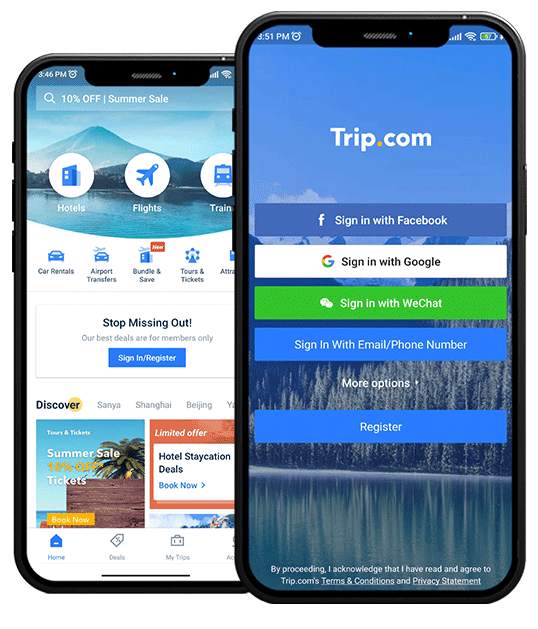
Trip.com’s mobile app provides travelers with a convenient way to search for travel options and manage bookings.
Users can access their reservations, itineraries, and other travel information from their mobile devices.
Trip.com App Benefits
-
- Easy access to bookings
- Convenient itinerary management
- Mobile travel information
- Booking notifications
- Quick access while traveling
- Centralized trip management
For travelers with multiple reservations, having their travel information available in one application can be convenient.
Trip.com Pros and Cons
Like any online travel agency, Trip.com has both advantages and disadvantages.
Pros
-
- Wide selection of flights and hotels
- Easy price comparison
- Competitive prices on selected routes
- Convenient website and mobile app
- Domestic and international travel options
- Multiple travel services in one platform
- Useful booking-management features
- Promotions and rewards may be available
Cons
-
- Third-party bookings can make complicated issues more difficult to resolve
- Refunds may take time
- Some fares have strict cancellation policies
- Prices may differ from airline or hotel websites
- Changes and cancellations can involve additional fees
- Customer-service experiences can vary
Trip.com vs Booking Directly
One of the biggest decisions travelers face is whether to use Trip.com or book directly with the airline or hotel.
| Factor | Trip.com | Direct Booking |
|---|---|---|
| Compare multiple airlines | Yes | Usually no |
| Compare multiple hotels | Yes | No |
| Price comparison | Excellent | Limited |
| Booking convenience | High | High |
| Direct airline support | No | Yes |
| Hotel options | Large selection | Limited to the brand |
| Handling complex changes | May involve third-party support | More direct |
| Rewards | Trip.com rewards | Airline/hotel rewards |
Trip.com can be a good choice when it provides a noticeably better price or a more convenient option.
Direct booking may be preferable when the price difference is small and you value having direct communication with the airline or hotel.
Trip.com Cancellation and Refunds
Cancellation and refund rules depend on the individual booking.
For flights, conditions can vary according to the airline and fare type. Hotels may also have different cancellation deadlines and refund policies.
Before booking, check:
-
- Whether the booking is refundable
- Free cancellation deadline
- Cancellation fees
- Change fees
- Refund conditions
- Processing times
- Non-refundable restrictions
Never assume that every Trip.com booking can be cancelled without a fee.
If flexibility is important, consider choosing a refundable flight or hotel rate when available.
Who Should Use Trip.com?
Trip.com can be a good option for travelers who:
-
- Want to compare several airlines
- Prefer comparing multiple hotels
- Are looking for competitive travel prices
- Book domestic or international trips
- Want flights and hotels in one account
- Prefer managing reservations through an app
- Are comfortable using an online travel agency
It may be less suitable for travelers who strongly prefer dealing directly with airlines or hotels, especially when booking expensive or complicated trips.
Tips Before Booking on Trip.com
Before completing your booking, keep these tips in mind:
Compare the Final Price
Don’t compare only the advertised fare. Check the complete price, including taxes, baggage, and other charges.
Check the Cancellation Policy
Understand whether your booking is refundable and what fees may apply.
Verify Your Details
Check names, dates, destinations, and other booking information carefully before payment.
Check Baggage Allowance
Make sure you know what baggage is included in your fare.
Save Your Confirmation
Keep your booking number, ticket, and confirmation details somewhere accessible.
Compare With the Official Website
Before paying, compare the same flight or hotel directly with the airline or hotel’s website.
Is Trip.com Worth It?

Trip.com can be worth using if you find a competitive price, convenient itinerary, or travel option that isn’t as easy to find elsewhere.
Its main strengths are its wide selection, convenient search experience, and ability to compare different travel products in one place.
However, the lowest price shouldn’t be the only factor.
For a simple trip, Trip.com can be a convenient option. For an expensive international journey or complicated itinerary, compare the total price and booking conditions with the airline or hotel’s official website.
Final Verdict: Trip.com Reviews
So, is Trip.com legit and safe?
Yes. Trip.com is a legitimate online travel agency that can be useful for booking flights, hotels, and other travel services.
The platform’s main advantages are its wide selection, convenient booking process, price comparison, and travel-management features.
At the same time, travelers should be aware that third-party bookings can sometimes make cancellations, changes, and refunds more complicated. The experience can also depend on the airline, hotel, fare conditions, and individual booking.
Overall, Trip.com is worth considering if it offers a competitive price or convenient travel option, but it’s always smart to compare the final price and terms with the airline or hotel’s official website before booking.